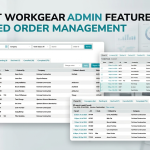
We’ve updated the Get WorkGear ordering interface, and the improvements are now live.
The goal is simple: help your customers choose the right items with more confidence, and help your team spend less time fixing avoidable order mistakes.
What’s improved
The ordering layout is clearer, so customers can review colours, sizes and options more easily before they confirm. That reduces common errors — such as selecting the wrong colour — and cuts the back-and-forth that usually follows.
Ordering with allocations
Where allocations are in place, remaining allocation is now more prominent.
Customers can see what’s still available while they build their order, which makes entitlement limits easier to understand and reduces orders that need to be corrected later.

Ordering without allocations
Where allocations are not used, customers can build orders line by line — including different colours, sizes and personalisation options — then review and edit their selections before adding everything to the cart.
That gives a clearer checkout path and fewer surprises at the end of the order.

Why it matters
Small interface improvements often make the biggest difference in day-to-day use:
- fewer incorrect selections
- less manual order correction
- a smoother experience for staff ordering their own gear
- less admin for the teams managing the programme
If you have any questions about the update, get in touch — we’re happy to help.


Published on Thursday, 15 October 2026 under News & Updates.